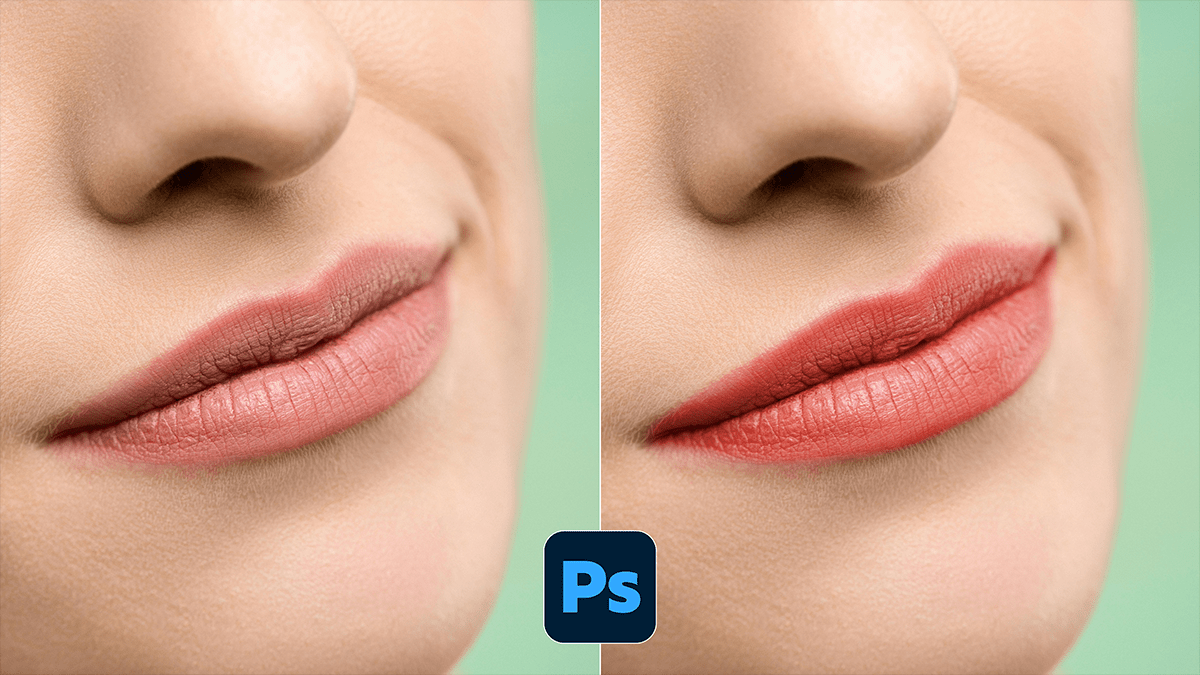
How to Lip Colour Change in Adobe Photoshop 2026,

Therefore, in Adobe Photoshop 2026, changing lip color has become remarkably fast thanks to AI-driven masking and the new adjustment layer workflows.
In other words, here are the three best ways to do it, ranging from the “one-click” AI method to the professional manual approach.
Method 1: The AI “Smart” Method (Fastest)
Therefore, the most efficient way in the 2026 version is using the Camera Raw Filter, which now features advanced facial recognition.
In other words, go to Filter > Camera Raw Filter.
Therefore, click the Masking icon (the circle with a dotted border) on the right toolbar.
In other words, wait a moment for Photoshop to detect people. Click on the thumbnail of the person’s face.
Therefore, check the box for Lips and click Create.
In other words, use the Hue, Saturation, and Temperature sliders to change the color.
Pro Tip: Use the Shift Hue slider to achieve a complete color swap while maintaining the natural texture.
How to Lip Colour Change in Adobe Photoshop 2026,
Step 2: Solid Color & Blend Modes (Best for Accuracy)
Therefore, if you want a specific lipstick shade (like a hex code), this is the way to go.
In other words, select the Lasso Tool (L) or the Selection Brush Tool and make a rough selection around the lips.
Therefore, go to the Adjustments Panel and click Solid Color. Pick your desired shade.
In other words, change the Layer Blend Mode from “Normal” to Multiply (for darker/richer colors) or Soft Light (for a natural tint).
The “Pro” Step: Double-click the layer (to the right of the name) to open Layer Styles.
However, in the Underlying Layer section at the bottom, hold Alt (Windows) or Option (Mac) and drag the white slider to the left. This “splits” the slider, allowing the natural highlights of the lips to shine through the color.
Method 3: Generative Fill (For “New Look” Styles)
However, if you want to change not only the color but also the texture (e.g., changing from matte to high-gloss), use AI.
Above all, select the lips with the Lasso Tool.
However, in the Contextual Task Bar that appears, click Generative Fill.
Above all, type a prompt like "matte deep plum lipstick" or "high-gloss cherry red lips".
However, click Generate and browse the variations in the Properties panel.
How to Lip Colour Change in Adobe Photoshop 2026,
Summary Table: Which one should you use?
| Goal | Best Method | Benefit |
| Quick Tweaks | Camera Raw (AI Masking) | Extremely fast; no manual tracing. |
| Exact Color Match | Solid Color + Blend Mode | Most control over specific hex codes. |
| Change Texture | Generative Fill | Can add gloss, glitter, or matte finishes. |
Would you like me to explain how to fix “color spill” if the lipstick accidentally gets on the teeth?
